Dynasys Workflow for Business Central
Follow every customer order from the first request to shipment — across sales, design, planning, purchasing, production, quality and shipping. Dynasys Workflow gives each department a shared board, plans the work as tasks with owners and dependencies, and moves forward by itself when orders are released, produced and shipped in Business Central.
See how it works
Every department sees the same picture: which projects are waiting for them, what is late and why, and what has to happen before an order can be released or shipped. Projects, tasks and history are stored in Business Central, so nobody keeps a separate spreadsheet again.
Features
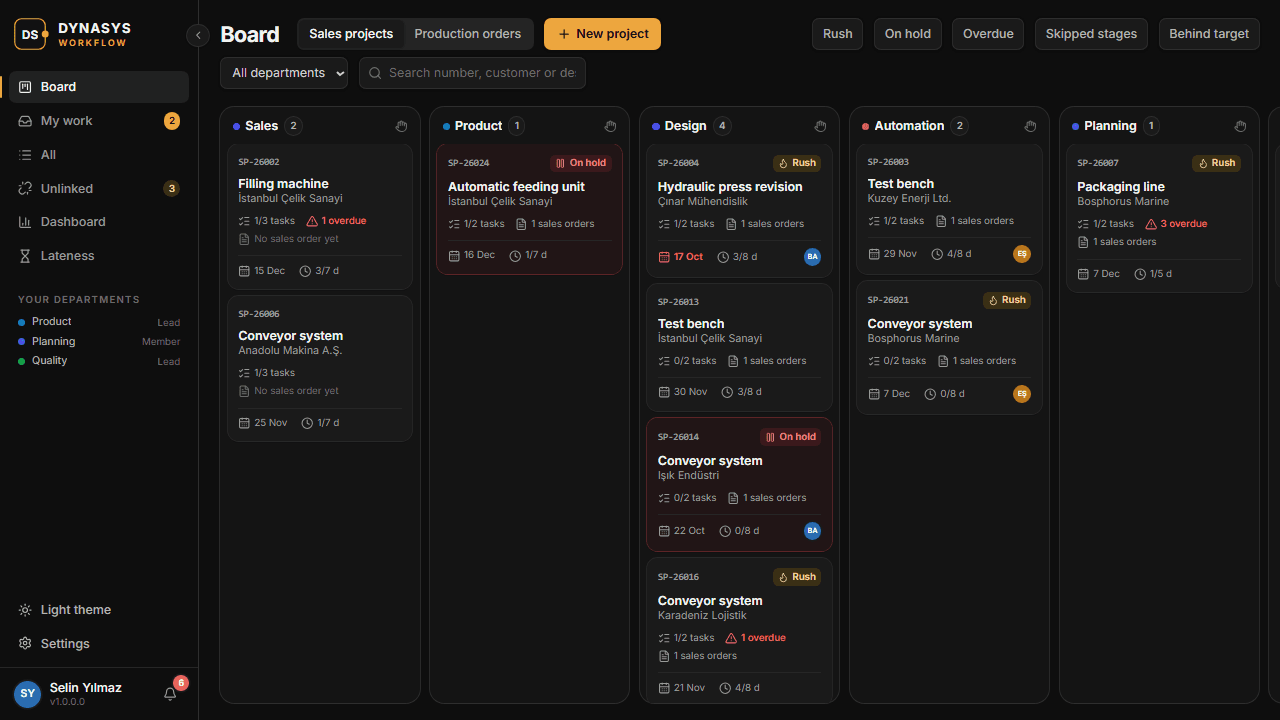
Department Board
Every sales project and production order on one board, in columns by stage and department. Filters for rush, on hold, overdue, skipped stages and behind target, plus a "My work" list for each person.
Tasks with Dependencies
Each stage holds tasks with a responsible person, co-workers, a duration and the tasks it waits for — also across departments. Tasks are planned automatically and re-planned when work starts or finishes.
Moves with Business Central
Releasing, finishing and posting in Business Central complete the matching stages by themselves. Production orders are linked to their sales orders and parent orders automatically, to any depth.
Gates on Release and Posting
Optional rules warn or stop a user who releases or posts a sales order, or releases or finishes a production order, before the workflow is ready. A lead can allow an exception once, with a reason.
Service Targets and Bottlenecks
Set a target in working days for each stage. Cards turn amber and red as targets near and pass, leads are told, and the dashboard shows where work is waiting longest.
Timeline and Lateness Analysis
A Gantt timeline of every project shows the original plan, the current plan and the dependencies. The lateness report splits each delay into late predecessors, waiting to start and taking longer.
Notifications and E-mail
In-app notifications and @mentions, plus a short e-mail digest through Business Central's own e-mail accounts: when a task can start, when work arrives at a department, or when something is late.
Files and Full History
Attach files and links to tasks, and require an attachment before a task can be completed. Every action — stage changes, comments, holds, exceptions — is kept in the project's history.
Licensing
- Licensed per company, for named users, with an annual licence key issued by DYNASYS.
- Every new company gets a 30-day free trial for up to 3 users, which starts automatically the first time the app is used.
- Only people who use the Workflow app need a licence. Colleagues who just post or release documents in Business Central do not.
- Licences are managed in Business Central on the Dynasys License Setup page, installed together with the app.
- To request a licence or a longer trial, use Request a License in Business Central or write to licenses@dynasys.tech.
See your orders move through the company
Book a short demo with your own departments and process, or start the free trial in your Business Central.